1. A first conversation with Lean
Before any mathematics, we need Lean installed and answering us. That is all this chapter does. By the end we will have a project on disk, an editor showing Lean's responses, and a file in which Lean tells us the type of something we wrote. No proving happens yet.
Be warned that this chapter downloads about ten gigabytes. That is not a mistake, and we explain below where it goes.
The toolchain
Lean versions are managed by elan, which installs compilers and switches
between them per project, in the way uv or pyenv does for Python. On
macOS:
On other platforms, follow the official setup instructions. Then install a compiler and make it the default:
The lean and lake commands are installed as shims in ~/.elan/bin, which
may not be on the PATH. We add it to the shell profile:
Open a new shell and check:
We wrote these notes against Lean 4.33.1. A later version will almost certainly work, but if something behaves oddly, that is the first thing to compare.
An editor
Lean is not written and then run. It is written in a constant conversation with
the compiler, displayed in a pane called the infoview, and without that pane we
are working blind. Seeing it requires an editor plugin: lean.nvim for Neovim,
or the official extension for VS Code. This is the one piece of setup we cannot
skip, because from chapter 3 onwards the thing we watch is a goal changing under
a tactic, and only the infoview shows that.
Follow Set up Neovim for Lean or Set up VS Code for
Lean now, and come back once opening a .lean file shows
an infoview. On a machine where no plugin can be installed, read a goal without
an infoview covers the notes with a
terminal alone.
A new project
Lean projects are managed by lake, which is the build tool and package
manager that comes with the compiler. In an empty directory:
The math template is what makes this a mathematics project rather than a
plain one: it adds Mathlib as a dependency. Use the name GameTheory, since
every import in these notes begins with it.
We now have a lakefile.toml describing the project, a lean-toolchain pinning
the compiler version, a GameTheory/ directory for source files, and a
GameTheory.lean alongside it that imports them.
Mathlib
Lean's core language has natural numbers and integers, and almost nothing else. It has no real numbers. Everything a mathematician expects, including ℝ, comes from Mathlib, a single enormous library maintained by the Lean community.
Compiling Mathlib from source takes hours, so it is distributed as prebuilt artefacts instead. Fetch them, then build:
This is where the ten gigabytes go: around 3GB for the compiler under ~/.elan,
and around 7GB for Mathlib under .lake inside the project. It is a one-off
cost. Once cached, a rebuild of a project this size takes about two seconds.
If we skip lake exe cache get, nothing will appear broken. Lean will quietly
start rebuilding all of mathematics, and we will wait a very long time.
A first file
Create GameTheory/Hello.lean:
import Mathlib.Data.Real.Basic

/-- The payoff to a defector meeting a cooperator: the temptation to defect. -/
def temptation : ℝ := 5

#check temptation

#check ℝ
Then replace the contents of GameTheory.lean, beside the directory, with a
single line, so that lake build knows the file exists:
Typing ℝ is done with the abbreviation \R, followed by a space or by carrying
on typing. Each editor how-to has a table of the ones we need most.
What Lean says back
The infoview is not a log of everything Lean has said. It reports on a single
position, the one the text cursor is sitting on, and it redraws every time the
cursor moves. No mouse and no hovering are involved. Put the cursor on line 6,
the #check temptation, and the infoview shows:
In VS Code the whole window looks like this, with the file on the left and the infoview on the right:
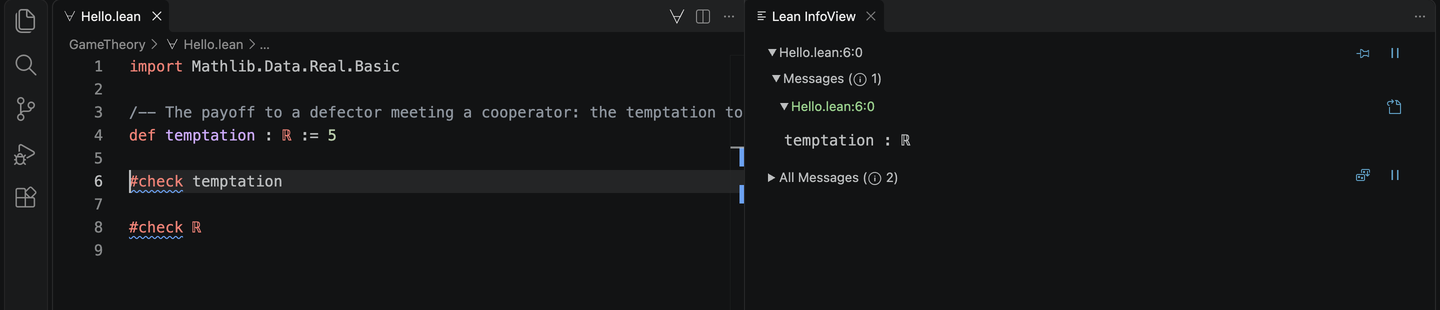
The screenshots in these notes are taken in VS Code. The Neovim how-to shows the same views in Neovim.
Move down to line 8 and it shows:
Put the cursor on a blank line and it shows nothing at all, because Lean has nothing to say about a blank line.
Editors differ in how they dress this up, and the Neovim and VS Code how-to guides record the differences. What does not differ is the rule: the infoview answers for one position at a time.
Those two answers are worth reading slowly, because three ideas are already present.
The first is that def temptation : ℝ := 5 is a definition with its type
written down. The pattern is name, then colon and type, then := and the
value. Lean would have inferred a type had we not given one, but in these
notes we write types out, because the type is usually the mathematically
interesting part.
The second is that #check asks Lean for the type of an expression, and Lean
answers with expression : type. It is the primary way to interrogate a Lean
file, and we will use it constantly.
The third is the odd-looking ℝ : Type. In Lean, types are themselves
expressions with types. ℝ is a perfectly ordinary thing to hand to #check,
and its type is Type. This is not a curiosity: it is the reason a single
language can talk about numbers, about games, and about propositions,
uniformly.
The text between /-- and -/ is a documentation comment attached to
temptation. Asking Lean about the name later will show it back, with K in
Neovim or the mouse pointer in VS Code.
Both messages can also be seen without an editor at all, and without moving a
cursor anywhere, since lake build reports them together:
Where we are
Lean is installed, a project exists, and the compiler is answering questions about expressions we wrote. That is the whole of chapter 1.
Nothing so far is a proof, and nothing so far could be wrong in an interesting way. In the next chapter we write down the Prisoner's Dilemma as a Lean object, which is the last chapter before we start proving things about it.